
What is a Sender ID?
A Sender ID is the branded name that appears at the top of a text message instead of a phone number. It tells the recipient who the message is from. For example, a business, club or organisation name. not properly registered can show as “Unverified”.
Sender ID guidelines
Your Sender ID must meet ACMA’s validation rules before it can be registered. In general, a Sender ID must:
- be 2 to 11 characters long
- use standard characters only
- not consist only of numbers
- not start or end with a space or underscore
- not contain the word “Unverified”
- not be offensive, deceptive or misleading
- have a valid use case, meaning it must clearly match and be linked to your
organisation.
For organisations with an ABN, your Sender ID should match or clearly relate to one of the following:
- your registered business name
- your company name linked to an active ABN
- your registered trade mark
- your registered domain name, where that domain is linked to a legitimate website or active email address.
A Sender ID may be the same as your organisation name, a shortened version, an acronym, an abbreviation or an initialism. It may also include extra words connected with your organisation’s function, location or the purpose of the message, provided it still clearly identifies your organisation.
What is not permitted?
Sender IDs will not be accepted if they are offensive, deceptive, misleading, made up only of numbers, contain “Unverified”, or do not have a valid use case. A Sender ID also cannot consist solely of a restricted word published by ACMA. Restricted words include examples such as account, alert, bank, bill, delivery, info, message, notice, service, support, urgent, verify and verified. Restricted words may only be used when combined with other characters that clearly identify your organisation, such as “ACMA Alert”.
What to do before applying through Summit One
1. Review the Sender ID you want to register
Before applying, make sure the Sender ID you want to use meets the rules above and is clearly linked to your organisation. Useful checks include:
- ABN Lookup for your ABN and business name
- IP Australia Trade Mark Search for registered trade marks
- auDA WHOIS for your domain name registration.
2. Confirm your authorised contacts are up to date on the ABR
To access the register after Summit One applies on your behalf, your organisation must either have the relevant person listed as an authorised contact on the ABR, or that person must be approved by an authorised contact on the ABR. If your authorised contacts are not up to date, you may not be able to access the register. You can check your business details via ABN Lookup and update your details through the ATO and ABR process.
3. Nominate the right Authorised Representative
Before you apply through Summit One, decide who your organisation’s Authorised Representative will be. For Summit One applications, the best choice is usually a person already listed as an authorised contact on the ABR who works as an office holder within the business. That person should also have access to their business email address and mobile number so they can complete the authorisation steps promptly. Under the register rules, the person making the request must be listed as an authorised contact on the ABR or otherwise authorised by the entity, must pass an identification check and must agree to the register’s terms of use.
4. Set up a myID Digital ID
Your Authorised Representative will need to prove their identity using the Australian Government’s myID app when logging in to ACMA Assist to view, confirm or revoke Sender IDs for your organisation. Please set this up before you apply if possible.
5. Tell us if you are applying for multiple venues, brands or on behalf of another entity
If you operate multiple venues or brands, the cleanest approach is usually to register the Sender ID that matches the specific venue or entity that owns and uses it. If one entity is acting on behalf of another, or if you are using a Sender ID owned by another business, extra authorisation steps may apply. Summit One may need confirmation from the Sender ID owner before the application can proceed.
How to apply for a Sender ID through Summit One
Step 1: Nominate your clubs’ Authorised Representative
1. Log into your Summit One account
2. Find your admin settings: admin > accounts > edit (icon)
3. Enter the details of your nominated Authorised Representative
a. Full name
b. Mobile
c. Email (preferably linked to your registered domain)
4. Advise the nominee of the below.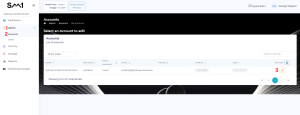
Step 2: Verify the ACMA’s registration.
You, or your nominated Authorised Representative will shortly after receive instructions from the ACMA via email on how to complete the registration. If you yourself are not listed as an authorised contact for the club on the Australian Business Register, you may still receive instructions from the ACMA via email on how to complete the registration. If so, you need to forward the email to the clubs’ Authorised Representative
nominated in Step 1.
The ACMA requires your nominated Authorised Representative during this process to:
1. Create an ACMA Assist account (if not already done before)
2. Verify their identity using MyID
3. Make sure the contact details in the register are up to date so you can get updates
about your registration.
Note: The ACMA now requires your myID identity strength to be Standard or higher. If you have a
Basic identity strength (with no document check), you will need to open your myID app and upgrade
to Standard. If you have already verified at Standard or higher, no action is required.
Visit myID.gov.au for more information on upgrading your identity strength.
Once logged in, simply:
- select your sender ID(s), and
- select “Confirm registration of Sender ID application”. That’s it.
Step 3: Await confirmation from Summit One
No more action will be required on your end.
Once your registration has been approved by the ACMA, they will notify Summit One and your nominated Authorised Representative. This may take several days.
Once we receive approval from the ACMA, your sender ID will be processed in Summit One.
Both yourself and your nominated Authorised Representative (if not one and the same) will then be notified by Summit One that your sender ID has been processed and ready to start sending.
If you have already registered a Sender ID with the ACMA
If you have already registered your sender ID with the ACMA, you can use it with Summit One without going through the aforementioned process. Please contact your account manager if this applies to you.
Likewise, registering your Sender ID through Summit One does not limit your sender ID usage to the Summit One platform. You are able to use your sender ID with any Australian supplier.
Costs and fees
Any Summit One fees for assisting with a Sender ID application will be disclosed before you proceed. ACMA also notes that there may be fees in future for using the register, and any such fees would be communicated before implementation.